 DeepTranslate
How to Translate a Facebook Page [Complete Solution]?
Translate Facebook Pages into Bilingual View
Install DeepTranslate and read Facebook pages in two languages in your browser!
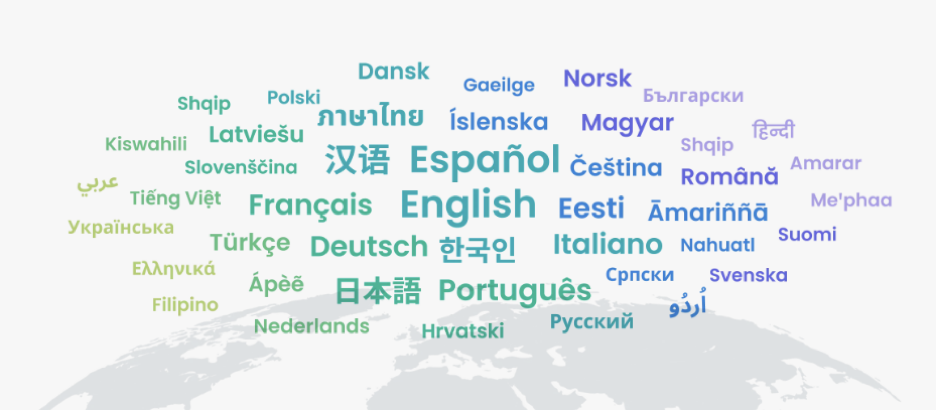
Translating Facebook pages into different languages can seem daunting, especially if you're unfamiliar with the tools available. Fortunately, with modern translation technologies, it's now easy to translate Facebook pages, posts, and comments in just a few clicks. Whether you're managing a multilingual community or trying to understand content in another language, this guide will walk you through the best tools and methods to learn how to translate a Facebook page quickly and accurately.
How to Translate Entire Facebook Pages on Browsers?
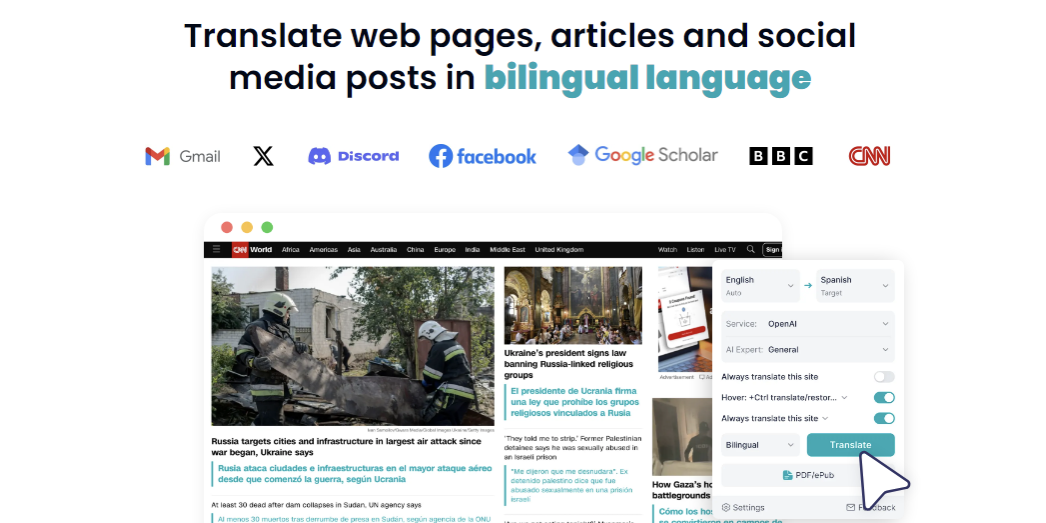
One of the most convenient ways to translate entire Facebook pages in your browser is by using a browser extension like DeepTranslate. This powerful tool enables users to translate full pages with just a click instantly and supports over 140 languages. Whether you need to translate Facebook to English or any other language, DeepTranslate is your go-to solution for seamless translations.
With DeepTranslate, you can translate more than just the surface text. You can translate posts, comments, and even live chats on Facebook Messenger. This makes it ideal for users who frequently engage in multilingual conversations or need to understand content from different language regions.
How to Translate Facebook Pages into Two Languages?
For users needing a bilingual solution, DeepTranslate offers a feature that simultaneously translates pages into two languages. This is especially helpful for those who engage in multilingual discussions or research on Facebook. Whether you're using translate in Facebook Messenger or translating posts, DeepTranslate's bilingual page function ensures you can view content in two languages. DeepTranslate translates:
- Complete Facebook pages
- Individual posts and comments
- Conversations in Facebook Messenger
This bilingual function ensures that even if you engage with content in two languages, you can always understand and respond accordingly.
Translate Facebook Pages into Bilingual View
Install DeepTranslate and read Facebook pages in two languages in your browser!
3 Translation Chrome Extensions Alternative
While DeepTranslate offers a robust set of features, there are several other Chrome extensions you can use to translate a Facebook page effectively:
- Google Translate Chrome Extension: This widely-known tool automatically translates entire web pages, including Facebook pages, into your preferred language. You can also use it to translate individual posts and comments with ease.
- DeepL Translator: Known for its superior translation quality, DeepL handles lengthy texts and complex terminology better than many other options. However, it supports fewer languages than other tools like Google Translate or DeepTranslate.
- XTranslate: XTranslate provides a user-friendly interface and works offline, making it ideal for quick translations of specific parts of a Facebook page. It’s particularly useful for working with PDFs or other text-based content alongside Facebook.
How Do I Translate a Post or Comment on Facebook Written in Another Language?
Facebook offers an option to translate posts and comments, but it often falls short when translating more complex languages like Hindi. If you're looking to translate Facebook from Hindi, here’s how you can ensure accurate translations:
- When viewing a post or comment written in another language, right-click on the text and select “Translate to English” from the dropdown menu.
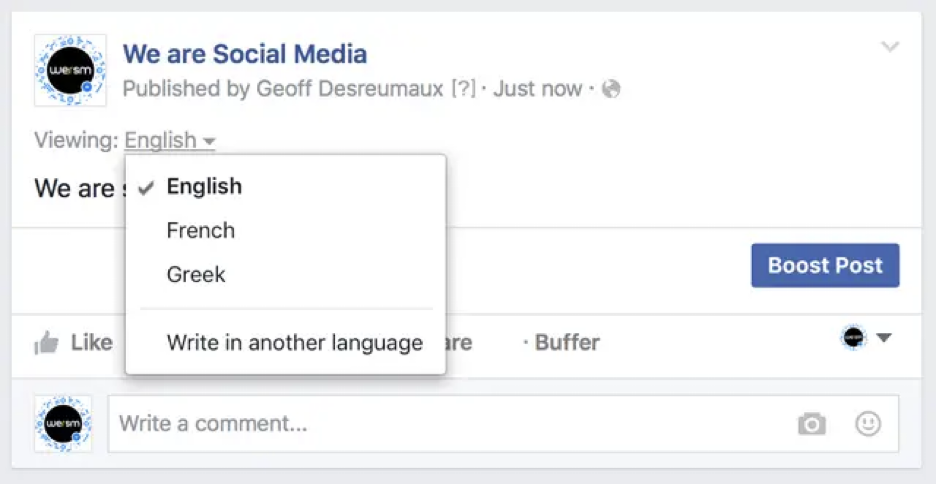
- Facebook will then use its default translator to translate the post or comment.
However, if the translation quality is poor, it’s recommended to use an extension like DeepTranslate to achieve more accurate results. Copy the post or comment, open DeepTranslate, and paste the text for a reliable translation. This method works well for comments in Hindi, Spanish, Chinese, and other languages.
Translate Facebook Pages into Bilingual View
Install DeepTranslate and read Facebook pages in two languages in your browser!
How to Change Language Settings on Facebook?
Facebook allows users to customize their language settings, which can greatly enhance your user experience. For example, if your default language is Hindi, but you need to translate Facebook to English, you can do so by following these steps:
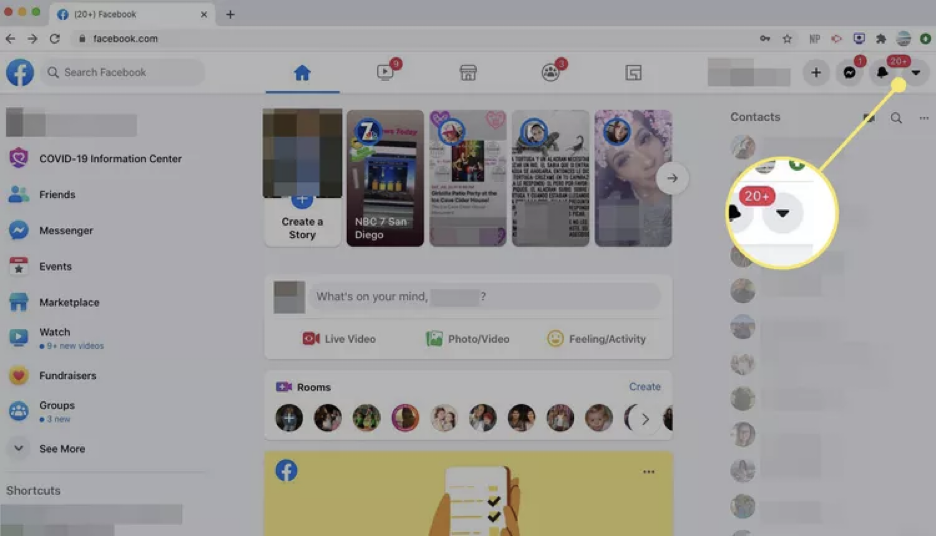
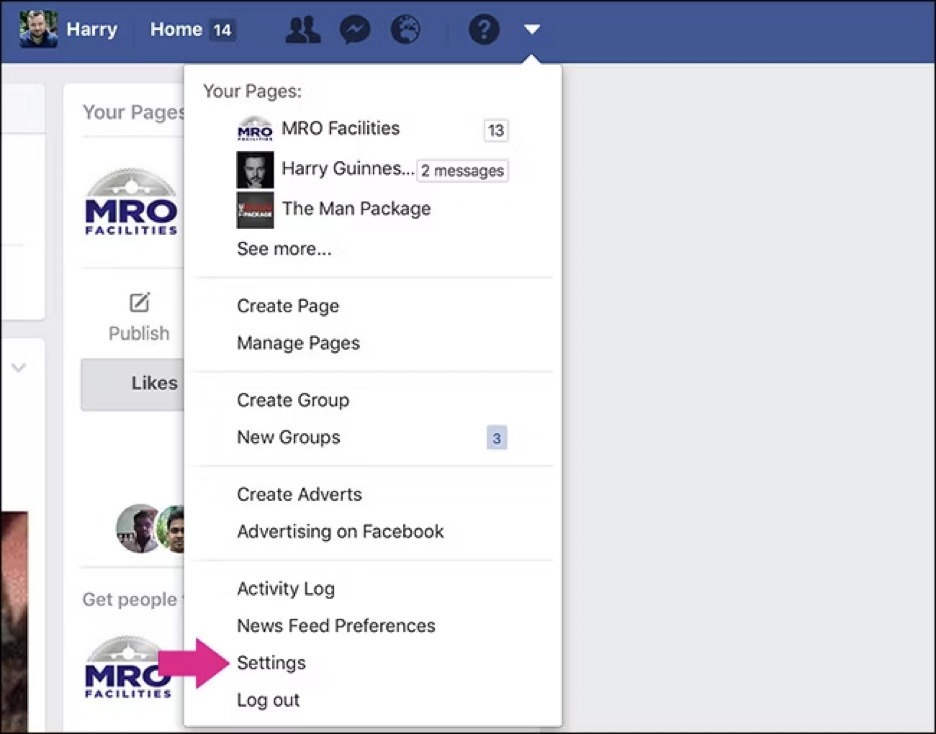
- Navigate to Settings by clicking the downward arrow in the top right corner of the Facebook page.
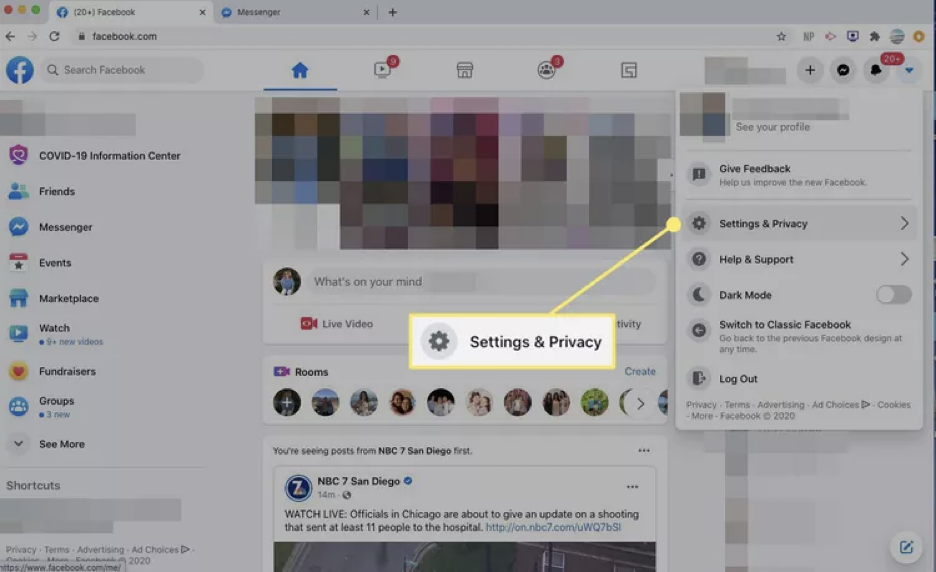
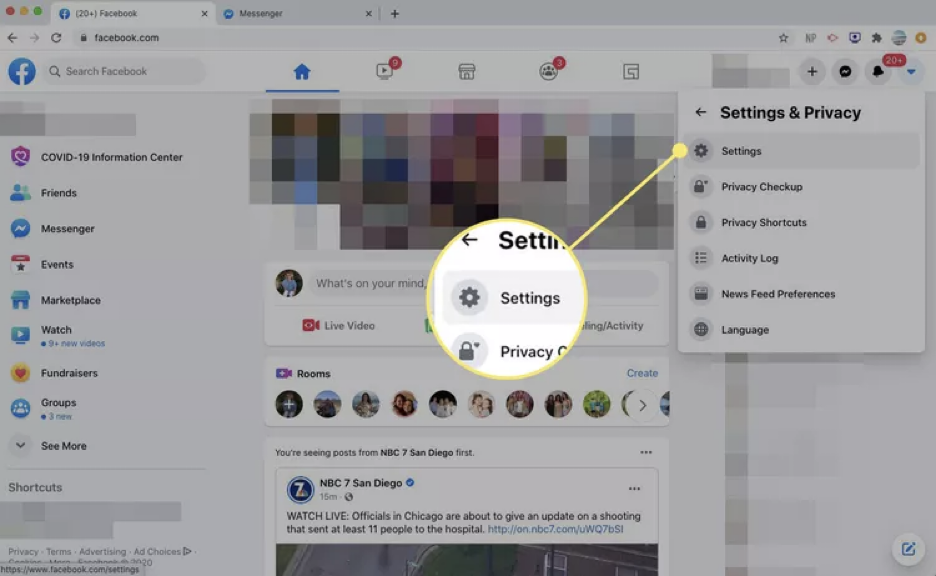
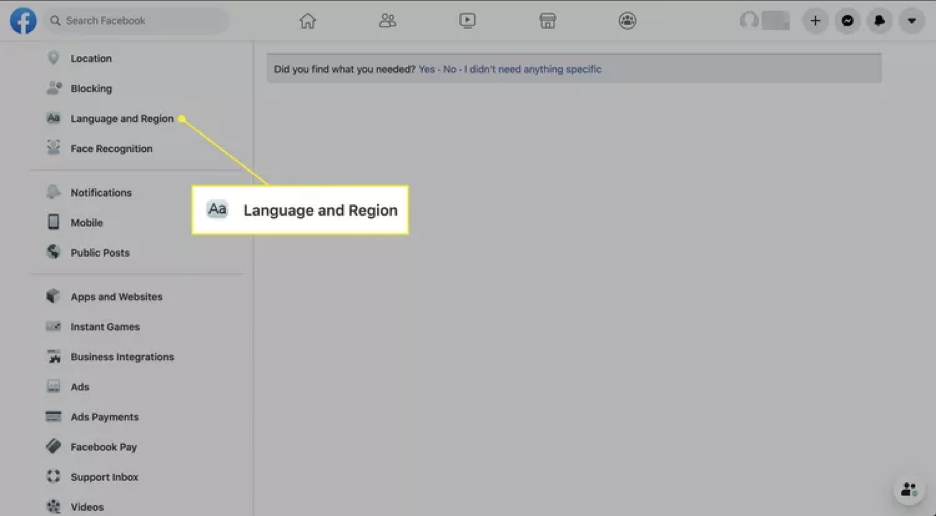
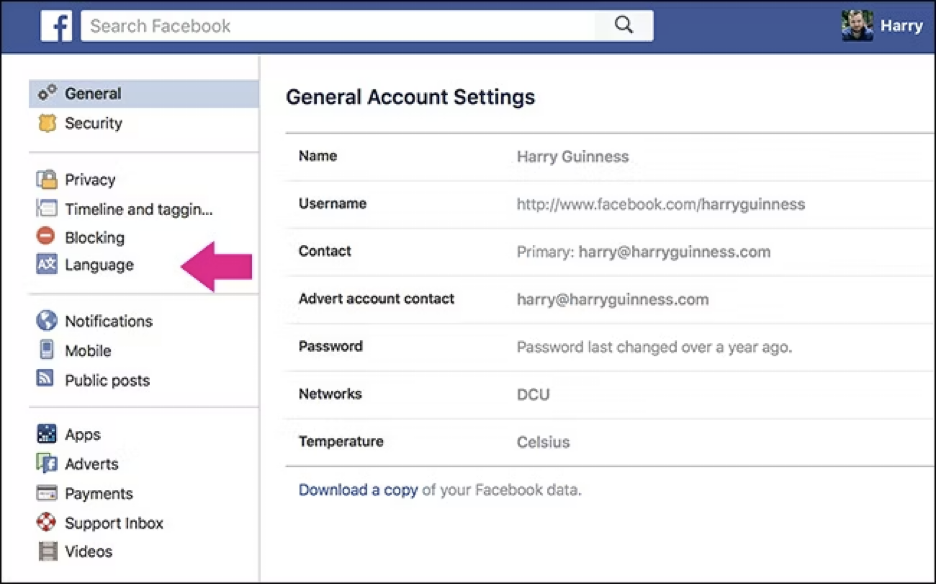
- Select Language and Region from the options on the left-hand side.
- Next to Facebook language, click Edit and select your preferred language from the dropdown menu.
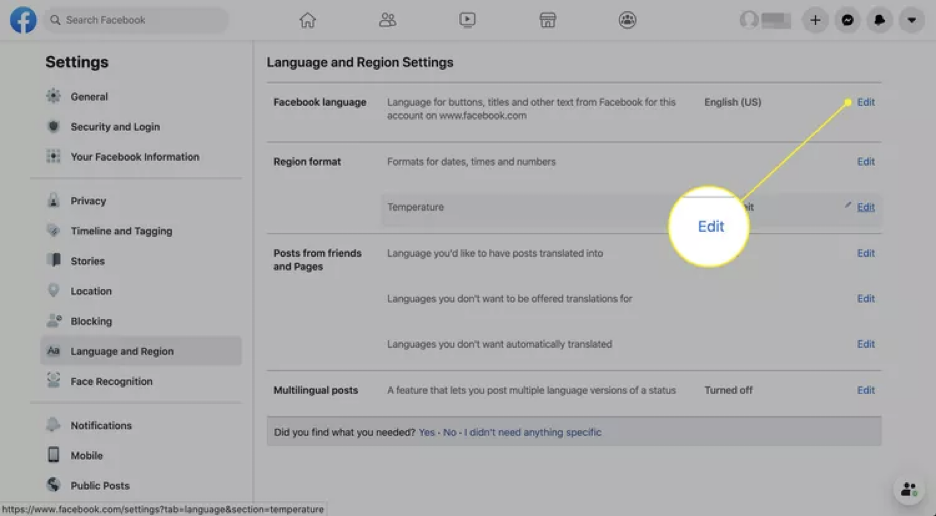
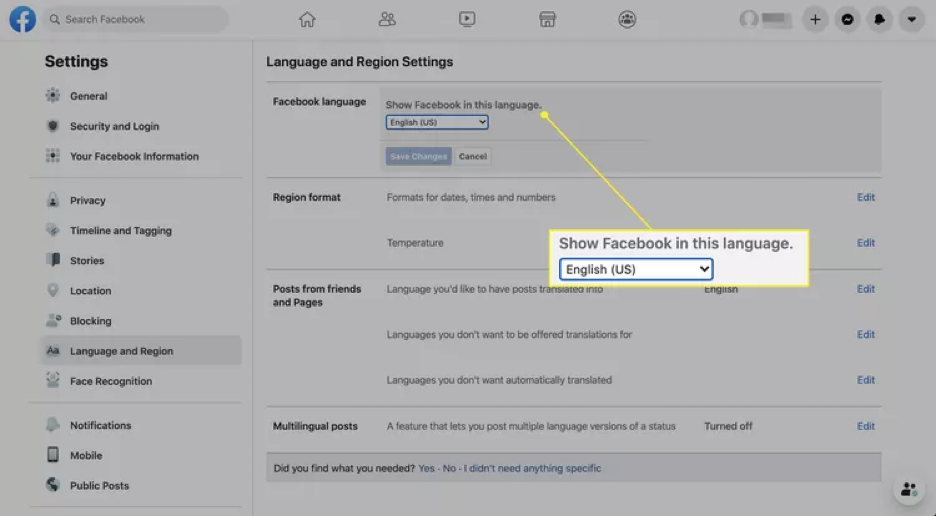
- Click Save Changes.
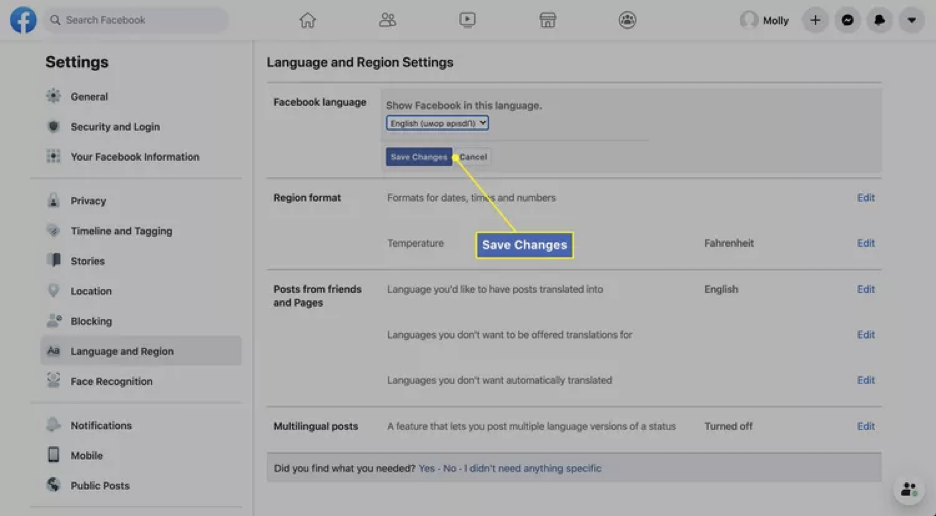
This will change the interface language across Facebook, including buttons, notifications, and other visible text.
Translate Facebook Pages into Bilingual View
Install DeepTranslate and read Facebook pages in two languages in your browser!
FAQ About Translating Facebook Pages
To help you fully understand how to translate a Facebook page effectively, here are some frequently asked questions:
Why can't I see translation options on Facebook?
If your Facebook Translate is not working, it may be due to language settings or a temporary issue with Facebook’s translation service. Try using an external tool like DeepTranslate for better results.
How can I translate conversations in Facebook Messenger?
Using external extensions like DeepTranslate makes it easy to translate in Facebook Messenger. Copy the conversation text, open the extension, and paste it to get an accurate translation. This is particularly useful for bilingual conversations or professional engagements.
Can I use Facebook's built-in translation feature for all languages?
Facebook supports a wide range of languages, but its translation quality often needs improvement for complex languages like Hindi or Japanese. Using extensions like DeepTranslate ensures that your translations are accurate and nuanced, especially when dealing with idiomatic expressions.
How to Turn Off Auto-Translate on Facebook Pages?
While Facebook’s auto-translate feature can be useful, it’s not always perfect. If you find the automatic translations inaccurate or unnecessary, you can turn off this feature:
- Go to Settings.
- Navigate to Language and Region.
- Scroll down to the section that says "Always translate posts in another language."
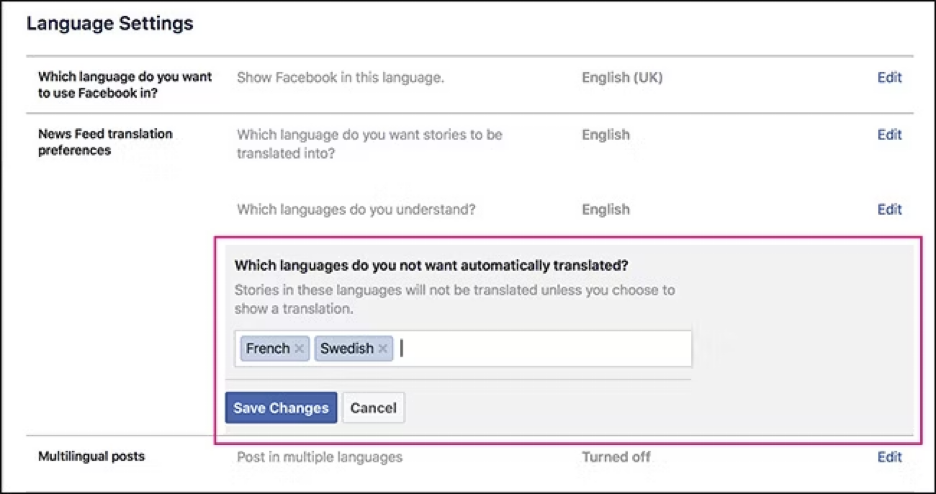
- Uncheck the box to disable the feature.
Now, Facebook will no longer auto-translate posts for you. Instead, you can manually translate posts using external tools like DeepTranslate for more accurate translations.
Translate Facebook Pages into Bilingual View
Install DeepTranslate and read Facebook pages in two languages in your browser!
Why Can't I See Translations on Facebook?

If your Facebook translate to English is not working, here are a few things to check:
- Language Support: Make sure Facebook supports the language you're trying to translate. If not, you'll need to use an external extension like DeepTranslate.
- Browser Compatibility: Ensure that your browser supports the translation tool you're trying to use. If the built-in translator isn't working, try reinstalling it or switching to a different browser.
- Temporary Glitch: Sometimes, translation features might be temporarily down. In this case, it’s recommended that DeepTranslate be used as a reliable backup.
Conclusion
Translating Facebook pages, posts, and comments is easier than ever with tools like DeepTranslate and other browser extensions. Whether you need to translate Facebook from Hindi, translate Facebook to English, or handle complex conversations in Facebook Messenger, these tools provide a seamless, bilingual experience that Facebook’s native tool often cannot.
By following this guide, you'll never have to worry about how to translate a Facebook page or language barriers on Facebook again. With DeepTranslate offering real-time, accurate translations, you’ll always stay connected, no matter the language!